Product configurator or product options app for Shopify?
Short answer
A Shopify product configurator shows shoppers a live picture of their choices, as a layered image or 3D model that updates as they pick colors, materials or text. A product options app collects the same choices as form fields, adds any charges and saves them on the order, without the picture. For most engraving, monogram and add-on setups, an options app is enough.
A configurator is worth the cost and setup when seeing the finished product is what makes someone buy, or when a wrong order is expensive.
We make Infinite Options, which is an options app and not a visual configurator. We've tried to be fair to both kinds of app below, and we name configurator apps we think are worth a look.
What a product configurator is
A product configurator (also called a product customizer or visual personalizer) puts a preview on the product page that changes as the shopper makes choices. Common approaches:
- Layered images. The product is built from stacked transparent images: a base shoe, then a layer for the sole color, the laces, the logo. Picking "red laces" swaps one layer.
- Text on product. The shopper's text is drawn on the product photo in the chosen font, in a defined print or engraving area.
- Multiple views or 3D. Some configurators show the product from several angles, and some use a 3D model the shopper can rotate.
- Print-ready output. Customizers aimed at print on demand can generate a production file from what the shopper designed, so nobody has to rebuild it by hand.
The catch is setup. Every product needs artwork prepared for it: separate layers for each part and color, print areas, fonts, sometimes a 3D model. That's where most of the time and cost goes.
What a product options app is
A product options app adds extra fields to the product page beyond Shopify's variants: text boxes, dropdowns, swatches, checkboxes, date pickers, file uploads. Typical features:
- Conditional logic, such as showing an "Engraving text" box only when the shopper picks "Add engraving".
- Price add-ons, such as +$10 for engraving or +$5 for gift wrap. We cover the details in charging for product add-ons.
- Validation, such as required fields and character limits.
- Order details saved as line item properties, so the shopper's choices show in the cart, at checkout, on the order and on packing slips.
What it doesn't do is render the result. Some options apps show image swatches or font previews, but the product photo itself doesn't change to show the shopper's text or color combination. If you're not sure whether you need an options app at all or just Shopify variants, start with variants vs product options.
Configurator or options app: side by side
| Question | Options app | Visual configurator |
|---|---|---|
| What you sell | Engraving, monograms, gift messages, add-ons, made-to-order items with known choices | Products where appearance is the decision: color combinations, fabrics, finishes, designed artwork |
| Visual risk of a wrong order | Low to medium; text and choices are easy to read back in the cart | High; shoppers can't picture the result from a list of choices |
| Number of combinations | Any, but the shopper doesn't need to see each one | Many combinations the shopper wants to compare visually |
| Setup effort per product | Minutes; one option set can cover many products | Hours or more; each product needs its own template and artwork |
| Artwork and assets | Optional swatch images | Layered images, print areas, fonts, sometimes 3D models |
| Typical price (as of October 2026) | About $10 to $40/month for a plan with price add-ons and conditional logic | Often $49/month or more, plus per-order fees on some apps |
When an options app is enough
An options app fits when the shopper already knows what they're getting and you just need the details right.
- Engraved jewelry with fixed fonts. A ring or pendant with two or three font choices and a character limit. The shopper picks a font from a swatch, types the text, and the order says exactly what to engrave.
- Monogrammed bags and towels. Three initials, a thread color and a style. The risk is letter order, not appearance, and clear labels solve that. Our personalization guide covers how to set up those fields.
- Gift wrap, rush production, care kits. These are add-ons, not design choices. There's nothing to preview.
And sometimes you don't need an app at all. A single text field can be added with a line item property in your theme, which is fine for one product with one input and no extra charge.
When a configurator is worth it
A configurator earns its cost when seeing the product is what sells it, or when a misunderstanding means a product you can't resell.
- Custom sneaker colorways. A shopper picking colors for the upper, sole, laces and logo can't judge "navy, gum, white, gold" from a list. Layered images let them see it and try another combination.
- Furniture fabric and finish. A sofa in a chosen fabric with a chosen leg finish is expensive and often made to order. Seeing the fabric on the sofa, not just as a small swatch, reduces hesitation and returns.
- Print-on-demand text on mugs, shirts and posters. Shoppers want to see where their name sits and how big it is. Print-on-demand customizers also generate the print file, which saves real time at volume.
The tradeoff is per-product setup: fine for 20 highly visual products, not worth it for 2,000 products that only need a gift message.
If customers supply finished artwork rather than designing on the page, an upload field may be all you need. See letting customers upload a logo or artwork.
The hybrid: options app plus proofs
For high-value personalized items (awards, signs, fine jewelry, custom furniture), many stores skip the configurator and use an options app plus a proof step. The shopper picks options and types their text, the order is placed, and you send a digital proof by email. Production starts when they approve it.
You get an approved design without building templates for every product. It adds a day or two to fulfillment, so say so on the product page. We explain where previews help and where proofs work better in the live previews section of our personalization guide.
Configurator and customizer apps to look at
These are prominent visual customizer apps on the Shopify App Store. Details come from each listing, checked in October 2026; confirm before you install.
| App | Rating | Price (as of October 2026) | Free trial | Suits |
|---|---|---|---|---|
| Kickflip Product Configurators | 4.4 (135 reviews) | From $59/month plus up to 1.95% per custom product sale | 14 days | Multi-component products with layered visuals |
| Customily Product Personalizer | 4.9 (275 reviews) | From $49/month plus $0.10 to $1 per order item | 9 days | Print on demand, engraving and laser-cut items needing print-ready files |
| Teeinblue Product Personalizer | 4.9 (375 reviews) | From $49/month plus $0.10 to $0.40 per order item (none on the first 100 orders a month) | 14 days | Personalized gift and print-on-demand stores |
| Zepto Product Personalizer | 4.9 (1,417 reviews) | From $9.99/month | 15 days | Stores wanting a live preview plus form-style options at a lower price |
Kickflip Product Configurators
Kickflip is built for products made of several components the shopper can add, remove and color. The listing describes a real-time preview from multiple perspectives, live coloring of product areas, text and image personalization, conditional logic, dynamic pricing and Shopify inventory sync. Add-ons include white-label (+$49/month) and quote requests (+$99/month).
Customily Product Personalizer
Customily focuses on personalization with a live preview: text, photos, street and star maps, calendars and AI filters, plus clipart, background removal and Canva imports. Its strength is output: the listing says it exports ready-to-print, engrave or laser-cut files and connects with print-on-demand providers such as Printify, Printful and Gelato.
Teeinblue Product Personalizer
Teeinblue offers live preview of custom text, photos, clipart, maps and more, with AI photo effects, auto-generated production files, Canva and PSD imports, and print-on-demand integrations including Printify, Printful, ShineOn and Gelato.
Zepto Product Personalizer
Zepto sits between the two categories. The listing describes a live visual preview alongside 22 option types (text, image uploads, color swatches, file uploads), conditional logic and price add-ons, with plans from $9.99/month up to $69.99/month. If you want some preview without a full configurator budget, it's worth a trial.
If you've decided you don't need a live preview, our comparison of Shopify product options apps covers the form-based apps in the same way.
Where Infinite Options fits
To be clear: Infinite Options is not a visual configurator. It won't draw the shopper's text on your product photo or recolor a sneaker. It's a product options app, and it's built for the first set of cases above.
- Text, number and date fields, swatches, checkboxes, dropdowns, a font picker and file upload.
- Conditional logic, required fields and character limits.
- Price add-ons on selectable options, bundled with the main product as one cart line, or shown as a separate line for things like gift wrap.
- Option sets assigned by rules (all products, specific products, tag, vendor or product type), so one setup covers a whole catalog.
- Everything saved as line item properties, so it shows on the order and can go on packing slips.
Image swatches and the font picker give shoppers a visual cue for each choice, and that's often enough for engraving and monograms. Pair it with a proof step for expensive items. It starts at $12.99/month with a 14-day free trial (as of October 2026).
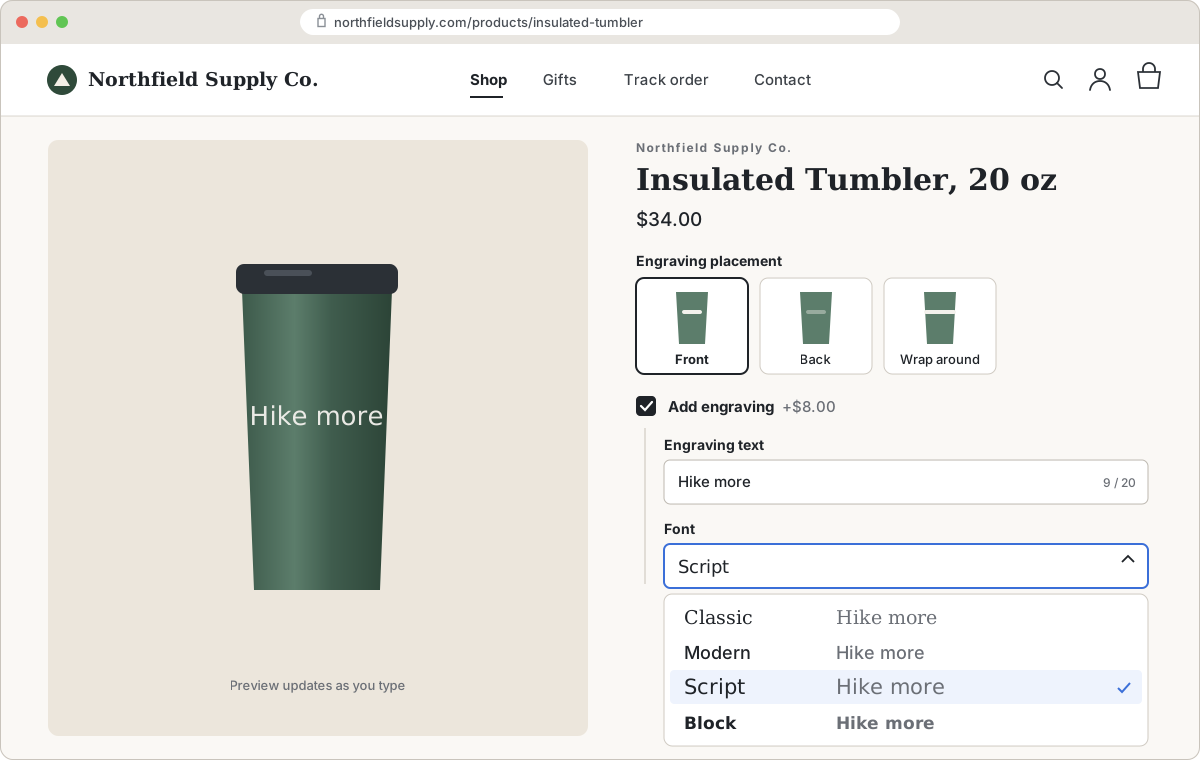
If you want a preview for a few products without a configurator app, you can build one on top of Infinite Options with layered images and a short script. Here's how to build a Shopify product customizer with a live preview.
FAQs
What is a Shopify product configurator?
A Shopify product configurator is an app that shows a live preview of the product as the shopper chooses colors, materials, parts or text, usually with layered images or a 3D model. Shopify doesn't include one, so it's added with an App Store app.
Is a product configurator the same as a product customizer?
The terms overlap. "Configurator" usually means choosing parts, colors and materials, as with sneakers or furniture. "Customizer" or "personalizer" usually means adding text, photos or artwork, as with print-on-demand mugs and shirts. Both show a live preview, which is what separates them from product options apps.
Does Shopify have a built-in product configurator?
No. Shopify variants let a product have up to 3 options and 2,048 variants, and each variant can have its own image, but there's no live rendering of combinations or custom text. For that you need a configurator or customizer app.
Can a product options app show a preview?
Partly. Options apps like Infinite Options can show image swatches and font previews for each choice, but they don't render the finished product. For expensive personalized items, sending a proof for approval after the order is a common alternative to a live preview.
Which is cheaper, a configurator or an options app?
Options apps are usually cheaper to run and much faster to set up: plans with price add-ons and conditional logic cost about $10 to $40/month. Configurator apps often start around $49/month or more, some add a fee per order, and each product needs artwork prepared for it (as of October 2026).