Shopify order tracking apps compared by job and store size
Trying to track a package? Use the tracking link in your shipping confirmation email, or the tracking page on the store you bought from. This guide is for Shopify merchants choosing a tracking app.
Short answer
The right Shopify order tracking app depends on the job you need done, not on the longest feature list. If you mainly want fewer "where is my order?" emails, a free or low-cost plan with a tracking page and order lookup in your store is usually enough.
Delivery estimates, late-shipment reports, dropshipping tools and shipping protection sit on higher plans, and the plan you need differs a lot from app to app.
This guide is organized by job and by store size. It compares Tracktor, AfterShip, CWILL, 17TRACK, TrackingMore and Track by Loop using their Shopify App Store listings as of October 2026. For a profile of each app, see our AfterShip alternatives comparison.
Full disclosure: we are ShopPad, and we make Tracktor. We have tried to be fair, used only what each listing says, and pointed out where Tracktor is not the right fit.
What a tracking app adds over Shopify's order status page
Every Shopify store already has an order status page. Customers reach it from their order and shipping emails, and for supported carriers it shows real-time statuses and a map. Shopify also sends Shipping confirmation, Shipping update, Out for delivery and Delivered emails on its own (Shopify's notification list).
What Shopify does not give you by default:
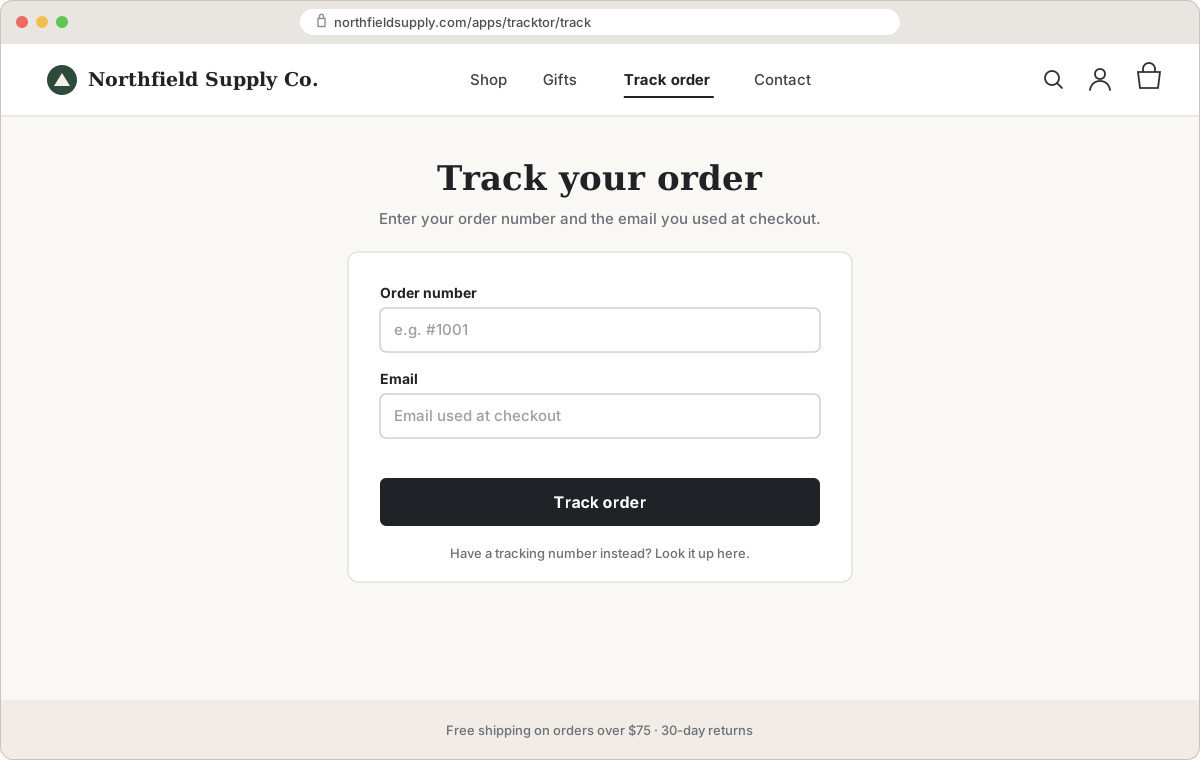
- A "track your order" page customers can find from your store's menu, with a lookup by order number and email.
- Estimated delivery dates.
- Reports on late or stuck shipments across all your orders.
- Dropshipping tools, such as replacing the origin location in tracking updates.
If your customers rarely ask where their order is, the built-in page may be all you need. If they do, a tracking app is a cheap fix. We cover the setup itself in how to add an order tracking page to your Shopify store.
Tracktor, our app, focuses on the first of those gaps. Tracktor Order Tracking puts a real-time tracking page and order lookup inside your store, on your domain and theme, on every plan including the free one. Paid plans start at $4.99 a month, and our free Expert Install Service will set it up for you.
Where Tracktor's tracking data comes from: Tracktor doesn't rely on a single tracking feed. For each shipment, it routes the carrier to one of five tracking data providers that supports it: Shippo, TrackingMore, 17TRACK, AfterShip or EasyPost. That combined coverage is how Tracktor supports more than 1,900 carriers on its free and low-cost plans.
The six jobs, and which plan each one needs
The table shows the cheapest plan on each listing that mentions the feature, with monthly prices as of October 2026. All six list an order lookup page as a feature. "Not listed" means we could not find it on the App Store listing, not that the app can't do it. Ask the developer if it matters to you.
| Cheapest plan with | Tracktor | AfterShip | CWILL | 17TRACK | TrackingMore | Track by Loop |
|---|---|---|---|---|---|---|
| Branded tracking page | Free | Free | Free | Free | Free | $99Starter |
| Proactive notifications | $4.99Flex | $11Essentials | $11Essential | $9Basic | $9Basic | $99Starter |
| Delivery estimates | $8.99Growth | Free | $11Essential | $49Pro | Free | $449Plus |
| Reporting on late or stuck shipments | $49.99Essential | $11Essentials | $11Essential | $159Premium | $55Pro | $189Premium |
| Dropshipping tools | $8.99Growth | Not listed | Free | Free | Free | Not listed |
| Returns or shipping protection | Not offered | Not listed | $11Essential | Listedplan not stated | Not listed | Not listed |
| Remove the app's branding | $8.99Growth | Not listed | $59Professional | $49Pro | Not listed | Not listed |
What the features look like on each app:
- Notifications: Tracktor triggers Shopify's own email and SMS notifications. AfterShip sends email and SMS, 17TRACK and TrackingMore send email, and Track by Loop sends through Klaviyo, Postscript or Attentive.
- Delivery estimates: AfterShip's free plan shows carrier dates, with AI-predicted dates on Premium ($70). CWILL's $11 plan shows estimates after purchase; estimates before purchase need Professional ($59). Track by Loop's is Delivery Promise.
- Reporting: Tracktor exports CSV reports. AfterShip's $11 plan has status reports, with full analytics on Premium ($70). CWILL lists advanced analytics, 17TRACK exception and on-time analysis, TrackingMore delivery performance analytics and Track by Loop advanced reporting.
- Dropshipping: Tracktor has dropship location substitutions; CWILL, 17TRACK and TrackingMore have a dropshipping mode.
- Protection: CWILL's is shipping protection. 17TRACK lists shipping insurance but not which plan includes it.
1. Cut WISMO emails with a findable tracking page
Most "where is my order?" emails come from customers who can't find the tracking link, not from lost parcels. The fix is a tracking page in your menu and footer where customers enter an order number and email. Five of the six apps include a branded tracking page on their free plan. Check where it lives: Tracktor's page is part of your store, AfterShip lists "Tracking page with your domain" on Premium, and CWILL's listing says its page is under your own domain without naming a plan.
2. Proactive notifications
Shopify already emails customers when an order ships, is out for delivery and is delivered. An app adds control over the content, more statuses, SMS, or a link to your branded page. Tracktor Flex ($4.99) is the lowest-priced plan here with email and SMS. These are Shopify notifications triggered by Tracktor's tracking updates, so customers get Shopify's own Out for delivery and Delivered messages rather than a second set of emails from the app. Track by Loop works through Klaviyo, Postscript and Attentive, which suits brands that already run their messaging there.
3. Delivery estimates
Estimates reduce the "is it late?" question before it is asked. TrackingMore and AfterShip list estimated dates on their free plans (AfterShip calls these carrier estimates and keeps AI estimates for Premium). If you want estimates on product pages or at checkout, before the order is placed, look at CWILL Professional, TrackingMore, AfterShip and Track by Loop, whose listings describe pre-purchase estimates.
4. Reporting on late or stuck shipments
This is where the bigger apps pull ahead. 17TRACK Premium has exception, transit time and on-time analysis, CWILL includes advanced analytics from $11, and AfterShip and Track by Loop both offer dashboards and fuller reporting on higher plans. Tracktor's reporting is CSV order and fulfillment reports on Essential. If chasing stuck parcels across thousands of orders is your main job, Tracktor is not the strongest choice.
5. Dropshipping needs
Dropshippers often want tracking updates that don't show the overseas origin. CWILL, 17TRACK and TrackingMore list a one-click dropshipping mode on their free plans. Tracktor's dropship location substitutions start on Growth ($8.99).
6. Returns or protection in the same tool
Tracktor does tracking only, with no returns and no shipping protection. CWILL includes shipping protection from Essential. If protection or returns are the main reason you're shopping, a protection-first app such as Route, covered in our AfterShip alternatives guide, may make more sense than a tracking app.
Pick by store size
Here is what each app costs per month at three volumes, using the cheapest plan that covers the volume and each listing's overage rate. We used monthly billing; most of these apps discount annual plans.
| Monthly cost (as of October 2026) | 100 orders | 500 orders | 2,000 orders |
|---|---|---|---|
| Tracktor | $4.99 (Flex) | $13.99 (Growth plus 100 extra at $0.05) | $49.99 (Essential) |
| AfterShip | $11 (Essentials) | $43 (Essentials plus 400 extra at $0.08) | $163 (Essentials plus 1,900 extra at $0.08) |
| CWILL | $11 (Essential) | $26 (Essential plus 300 extra at $0.05) | $59 (Professional) |
| 17TRACK | $9 (Basic) | $49 (Pro, 1,000 included) | $159 (Premium) |
| TrackingMore | $9 (Basic) | $24 (Basic plus 300 extra at $0.05) | $55 (Pro) |
| Track by Loop | $99 (Starter) | $99 (Starter) | $99 (Starter) |
Two caveats. AfterShip, 17TRACK and Track by Loop count shipments, so an order split into two parcels counts twice. 17TRACK's listing shows no overage rate, so we assumed you move up a plan rather than pay per extra shipment.
Under 200 orders a month
Start with Shopify's built-in page. If customers still email you, the free plans cover small volumes (Tracktor 25 orders, CWILL 20, AfterShip, 17TRACK and TrackingMore 50 shipments). Past that, every app except Track by Loop costs $4.99 to $11 a month. Track by Loop has no free plan and starts at $99, so it is built for bigger stores.
200 to 2,000 orders a month
This is where overage rates matter. At 500 orders, Tracktor Growth ($13.99) also includes delivery estimates and removes our branding, TrackingMore and CWILL sit in the mid $20s, and AfterShip Essentials reaches $43 at $0.08 per extra shipment. If you need AfterShip's own-domain page or AI estimates, Premium is $70 for 500.
2,000 orders a month and up
Price differences shrink and reporting matters more. Tracktor Essential, TrackingMore Pro and CWILL Professional cost $49.99 to $59 for 2,000. Track by Loop Starter covers 2,500 shipments for $99 with marketing integrations, and 17TRACK Premium ($159) adds the deepest shipping analysis of the group. Enterprise plans exist at CWILL (25,000 orders, $479) and TrackingMore (70,000, $1,189).
Questions to ask before installing
- Does it count orders or shipments? Tracktor and CWILL count orders. AfterShip, 17TRACK and Track by Loop count shipments. TrackingMore's free plan says shipments and its paid plans say orders. Split shipments make shipment counts higher.
- What happens when I go over? Look for the per-unit overage rate on the listing ($0.05 at Tracktor, CWILL and TrackingMore; $0.08 or $0.12 at AfterShip) and whether tracking pauses at the limit.
- Can I remove the app's branding, and on which plan? It ranges from $8.99 (Tracktor Growth) to $59 (CWILL Professional) in this group.
- Is the tracking page on my domain or the app's? A page on your own domain keeps customers in your store, where they can keep shopping.
- What happens to links in old emails if I uninstall? If your shipping emails link to a page the app serves, those links stop working once the app is gone. Tracktor's page runs at /apps/tracktor/track through Shopify's app proxy, so it goes away on uninstall too. Keep Shopify's order status link in your templates as a fallback.
If you already use 17TRACK or your customers end up on 17track.net, see our 17TRACK alternatives for Shopify merchants.
FAQs
What is the best Shopify order tracking app?
It depends on the job. For a low-cost tracking page and notifications, Tracktor, 17TRACK and TrackingMore cost $4.99 to $9 a month for 200 orders as of October 2026. For built-in shipping protection, CWILL. For deep shipping analytics, 17TRACK Premium or AfterShip Premium.
Is there a free Shopify order tracking app?
Yes. Tracktor (25 orders a month), CWILL (20 orders), AfterShip, 17TRACK and TrackingMore (50 shipments each) have free plans with a tracking page. Shopify's own order status page and shipping emails are also free.
Do I need a tracking app if Shopify has an order status page?
Not always. Shopify's order status page shows tracking for supported carriers, and Shopify sends shipping emails. An app helps when customers can't find their tracking link, or when you want delivery estimates, reports on late shipments or a tracking page in your store menu.
Do tracking apps charge per order or per shipment?
Both exist. Tracktor and CWILL count orders, while AfterShip, 17TRACK and Track by Loop count shipments. If you split orders into several parcels, a shipment-based plan fills up faster.